// Pre-release evaluation · v0.9

Shadow and Shield · Shield 399

A digital forensics platform built for the operator.

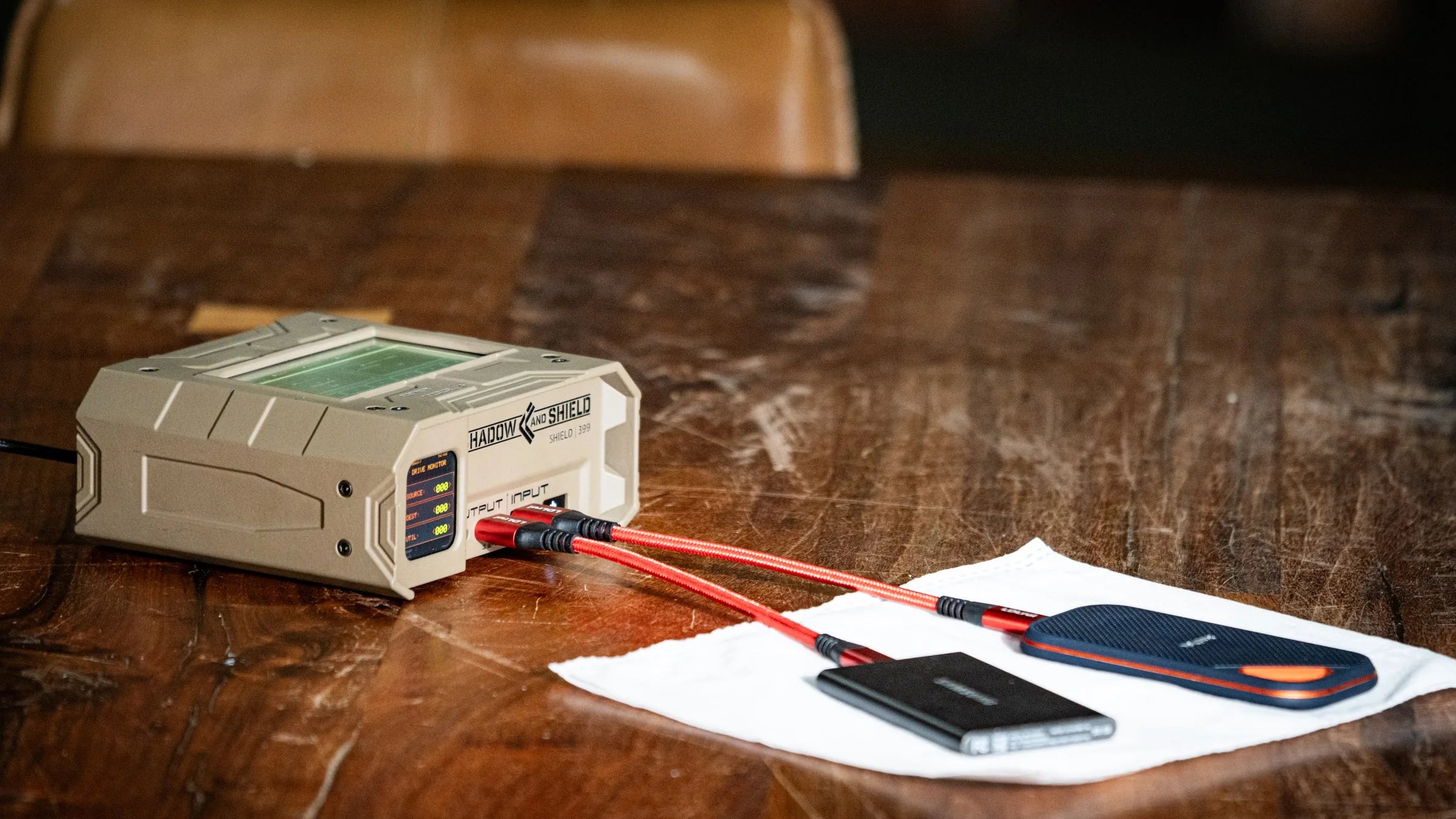
Shadow and Shield launches with Shield 399: a field-ready forensic toolkit, touchscreen appliance, and network dashboard for acquisition, sanitization, analysis, case work, and repeatable tool execution.

Technical users configure profiles once. Operators run approved work from the appliance. Tool execution, case activity, metrics, and results remain reviewable from the dashboard.

Shield 399 forensic appliance with labeled hardware callouts
Shield 399 Pre-release evaluation unit
  • FormatsE01 / Ex01 / AFF4 / DD / Synthetic E01
  • User ControlsProfiles, teams, roles, tool config
  • RecordTool execution, operator history, hashes, keywords, file listings
  • ChassisASUS 15 Pro Ultra 7 255H, 96 GB RAM, 1TB NVMe

Why It Exists

Built to keep forensic tools organized, accessible, accountable, and synchronized.

Shield 399 came from deployed work where data collection and processing outpaced operator capacity and every tool added another setup burden.

  • Useful forensic tools already existed, but each carried its own install, dependencies, and configuration.
  • Tool runs, drive context, notes, and collection priorities were difficult to track across disparate environments.
  • Technical users needed a way to configure a tool profile once.
  • Operators needed to connect media, run the saved profile, and hand off results without exhaustive retraining.

Built For

Built for real evidence work.

Designed for teams that collect, process, review, and hand off digital evidence across field and lab environments.

Law Enforcement + Digital Forensics Military / SOF Field Teams Intel + Government Programs Forensic Labs + Technical Examiners
MODE 01

Field Collection

Connect media, run approved profiles, and process evidence where the work starts without rebuilding configurations.

MODE 02

Lab Review

Review tool execution, hashes, file listings, keyword results, reports, and exports from the dashboard with case context attached.

MODE 03

Team Coordination

Manage users, roles, organizations, cases, selected metadata sync, and repeatable tool access across controlled teams and deployments.

Platform Overview

A platform for tools, operators, cases, and results.

Technical users configure tool profiles, set up cases, and review execution history through the network dashboard. Operators run the configured work from the Shield 399 touchscreen. Case context flows between both surfaces so activity, results, and review stay connected.

Shadow and Shield dashboard shown on a laptop beside the Shield 399 appliance
01

Tool profiles

A technical expert configures a forensic tool once. The saved profile becomes repeatable work that any approved operator can run from the appliance.

02

Touchscreen operation

Field operators run saved tool profiles directly from the touchscreen. Same configuration, same outputs, every operator.

03

Dashboard review

A network dashboard surfaces queue state, execution history, case activity, and metrics. Accessible from a laptop, tablet, or phone on the approved network — or paired directly to the appliance.

04

Case and team context

Cases, evidence records, users, organizations, and selected operational metadata can be synced across configured deployments.

Operations Dashboard

Hardware-paired software for case-aware review.

Authorized review on an approved local network. Case context, queue state, execution history, and exportable records are paired with the field unit.

Queue StateDependencies and durable execution history
Operator ContextIdentity, case context, hashes, warnings, and verification outputs
Exportable RecordsReports and records for technical review

Native Tooling

Ground-up Go tools, not wrappers.

These are first-party Go engines, not wrappers around open-source command-line tools. That gives Shield 399 direct control over long-running forensic work: progress, checkpointing, verification, error handling, and structured records are built into the workflow instead of inferred from command output.

02

Disk Cloner

Native Godd legacy1-to-many nativeVerify

One-to-one and one-to-many block cloning with checkpoint-backed resume, verification options, bad-sector tracking, and read-only handling for cloned destinations.

03

Wipe / Overwriter

Native overwriteHardware-assisted when verifiedTRIM/UNMAPshred/dd legacy
  • Hardware-assisted wipe paths when verified available from the connected device or bridge
  • Native software overwrite with deterministic patterns
  • Verification, progress, and wipe-operation records
04

Image Verify

Native E01/AFF4Ex01 via ewfverifyDAASH/BLAKE3
  • Reads Shadow & Shield advanced hash metadata (DAASH) where present
  • Validates MD5, SHA-1, SHA-256, and BLAKE3 hash material
  • Keeps E01 compatibility while adding stronger native verification
05

E01 Info

Native E01 infoDAASH-awareewfinfo-style
  • Inspects E01 segment layout, acquisition metadata, and media geometry
  • Shows compression and embedded legacy hash fields
  • Reads Shadow & Shield DAASH advanced hashes where present
06

Image Converter

Native streamingE01/DD/AFF4Synthetic decrypted E01Optional verify

Conversion workflows for E01, DD, AFF4, and decrypted synthetic E01 outputs where supported.

How the native E01 writer is constructed
  • The native Go imaging engine applies to E01 output; Ex01 uses ewfacquire.
  • Writes EWF-compatible segment files with standard file headers and .E01 to .E99, then .EAA rollover.
  • Builds EWF-style sections across segments, including header2, legacy header, volume/data, sectors, chunk data, table, table2, digest, hash, daash, next, and done.
  • Uses 4 MB E01 chunks during acquisition, with table offsets marking compressed chunks.
  • Supports compression modes and stores chunks uncompressed when compression would increase size, preserving compatibility.
  • Uses Adler32 checksums for section descriptors and section/hash/table payload structures; uncompressed chunks include a trailing 4-byte Adler32 checksum.
  • Compressed chunks are stored as zlib streams and marked through the table offset high bit.
  • Writes legacy digest and hash sections plus Shadow & Shield DAASH hashes: MD5, SHA-1, SHA-256, and BLAKE3.
  • DAASH does not affect industry-tool compatibility; tools that do not understand daash can ignore it, while Shadow & Shield Image Info and Image Verify can read it.

Full Tool Listing

What Shield 399 includes.

* Pre-release inventory. Minor names, defaults, and workflow details may change before launch.

The tool inventory includes native Go tools plus coordinated system and AI-assisted workflows. Each tool is surfaced through Shield 399's queue, records, permissions, and review model.

Verification

Image Verify

Native E01/AFF4Ex01 via ewfverifyDAASH/BLAKE3
  • Reads Shadow & Shield advanced hash metadata (DAASH) where present
  • Recomputes MD5, SHA-1, SHA-256, and BLAKE3 hash material
  • Records verification outcomes for supported image workflows
Conversion

Image Converter

Native streamingE01/DD/AFF4Synthetic decrypted E01Optional verify

Converts supported forensic image formats and handles selected synthetic-image workflows for decrypted output paths.

Sanitization

The Overwriter

Native overwriteHardware-assisted when verifiedTRIM/UNMAPshred/dd legacy
  • Hardware-assisted wipe paths when verified available from the connected device or bridge
  • Native overwrite with deterministic patterns
  • Verification, method-selection records, and wipe-to-format workflow support
Preparation

Drive Formatter

GPT / MBRNTFSexFATFAT32ext4XFSBtrfsF2FSHFS+

Creates partition tables and filesystems on destination media for post-wipe preparation or standalone formatting workflows.

Preparation

Drive Encryption Manager

LUKS1 / LUKS2Destination driveNTFS / exFAT / FAT32ext4 / XFSHeader backupKey slots
  • Provisions destination drives as LUKS-encrypted volumes
  • Creates the partition, LUKS container, mapped filesystem, and optional header backup
  • Records encryption operations and supports selected key-management workflows
Migration

Disk Cloner

Native Godd legacy1-to-many nativeVerify

Copies a source drive to one or more destinations with checkpoint-backed resume, verification, bad-sector tracking, and read-only handling for cloned destinations.

Migration

Drive Migrator

Partition-levelPreview planCopy + growGPT / MBRLUKS unlock
  • Copies source partitions into a recreated destination layout
  • Shows a migration preview with the planned layout
  • Supports unlocked LUKS migration
Extraction

Logical File Extractor

Copies selected files from a source drive or mounted forensic image to destination media as loose files or logical evidence output.

Hashing

Drive Hasher

Source driveMounted imageMD5 / SHA-1SHA-256 / SHA-512BLAKE2b
  • Hashes source drives or mounted forensic images
  • Stores one hash record per selected algorithm
Hashing

Partition Hasher

Computes hashes over a selected partition path and records partition-scoped digest results in the platform hash tables.

Analysis

File Hash Analyzer

Hashes enumerated files and compares them against registered reference sets for known-file classification workflows.

Analysis

Keyword Search

Searches enumerated filesystem records for literal keywords and optional regular-expression patterns, with exportable results.

Analysis

Encryption Detector

Scans source-device partitions for encryption indicators and records structured detections and unlock attempts where configured.

AnalysisAI-assisted

Translate Filenames

Detects non-English filenames from existing scan results and writes translated names back to review surfaces without modifying evidence.

Repair

NTFS Fix Tool

Runs selected NTFS repair and verification workflows against a partition when filesystem repair is appropriate.

Hardware

Smart Card Reader

Reads connected smart-card reader and card metadata, including PKCS#15-accessible details exposed through supported tooling.

Hardware

Bluetooth Scanner

Discovers nearby Bluetooth devices through the host adapter and records scan sessions with per-device metadata.

Technical Snapshot

Platform operating model.

A concise view of how Shield 399 organizes tools, profiles, operators, case context, and review surfaces for pre-release evaluation.

Profile-Driven WorkSaved configurations operators can run consistently
Source HandlingRead-only acquisition, scanning, and analysis paths
Review SurfaceDashboard access, reports, exports, and operator history
Sync ModelSelected case, user, organization, and operational metadata sync

Platform

Hardware unit
ASUS NUC 15 Pro Ultra 7 255H with 96GB of RAM and 1TB of NVMe
Software model
First-party tool execution tied to queue state, operational records, and dashboard review
Operator surface
Touchscreen operation or network dashboard when paired with a laptop, phone, or tablet
Origin
Built by daarc, Inc. from field, deployed forensics, and cyber experience

Execution

Tool profiles
Technical users save configurations for repeatable operator execution
Queue and status
Tool work can be queued, tracked, reviewed, and tied back to case context
Source controls
Automatic read-only source handling during acquisition, scanning, and analysis paths
Operational history
Tool execution and operator history remain available for review and reporting

Control and Review

Case management
Cases, evidence records, drive sessions, tool executions, exports, reports, and operators
Access control
PIN users, organizations, permissions, tool availability, and saved profiles
Dashboard access
Review from an approved network or directly paired laptop, tablet, or phone where configured
Sync model
Selected cases, users, organizations, and operational metadata can synchronize across configured deployments

Compatibility

Compatibility snapshot.

Representative formats, inputs, interfaces, and outputs for pre-release evaluation. Support varies by workflow, configuration, and detected device path.

Evidence Formats

E01Ex01AFF4RAW / DDSynthetic E01Individual file extraction

Hashing

MD5SHA-1SHA-256SHA-512BLAKE2b-256BLAKE3

Drive Interfaces + Signals

USB 3.xSATANVMeSMARTHPA / DCO indicators

Filesystems

NTFSexFATFAT32EXT4XFSBtrfsF2FSHFS+

Wipe + Verification

Single / multi-pass overwriteTRIM / UNMAPUSB-safe sanitize pathsNVMe sanitize where exposedSample-based verificationFull-drive verification

Encryption

LUKSLUKS1 / LUKS2BitLocker

Smart Cards

PIV / CACPKCS15USB CCIDATR captureCertificate metadata

Search + Reference Sets

Keyword listsRegex patternsNSRLCustom hash sets

Exports

CSVJSONTXTHTMLFile listings + metadataKeyword resultsHash outputs

Field Dossier

Details that separate Shadow and Shield from a tool collection.

The platform is not just a launcher for forensic utilities. These clauses highlight first-party capabilities, workflow records, and team features built into Shadow and Shield.

Clause 01

Native Go forensic imager optimized for modern CPU architecture

Clause 02

LUKS and BitLocker credential handling for encrypted evidence workflows

Clause 03

Source-drive detection, review, and read-only handling controls

Clause 04

Filename translation into English for supported export outputs

Clause 05

Tool execution history, results, hashes, and operator records

Clause 06

Team, organization, and case metadata sync with metrics and reporting

About daarc

A Florida company building forensic tools for operational environments.

Shadow and Shield is developed by daarc, Inc., a United States company based in St. Petersburg, Florida.

daarc, Inc. St. Petersburg, Florida

Pre-release Access

Join release updates.

Shadow and Shield is in active development and pre-release testing. Get product progress, launch details, and availability updates from daarc.